
Inquiry to appointment: the 7-touch sequence that actually books showings
A fast first reply wins the conversation. A disciplined 72-hour sequence books the appointment. Here is the exact cadence — who drafts, who approves, and what happens when they say not yet — so inquiries stop dying after day one.
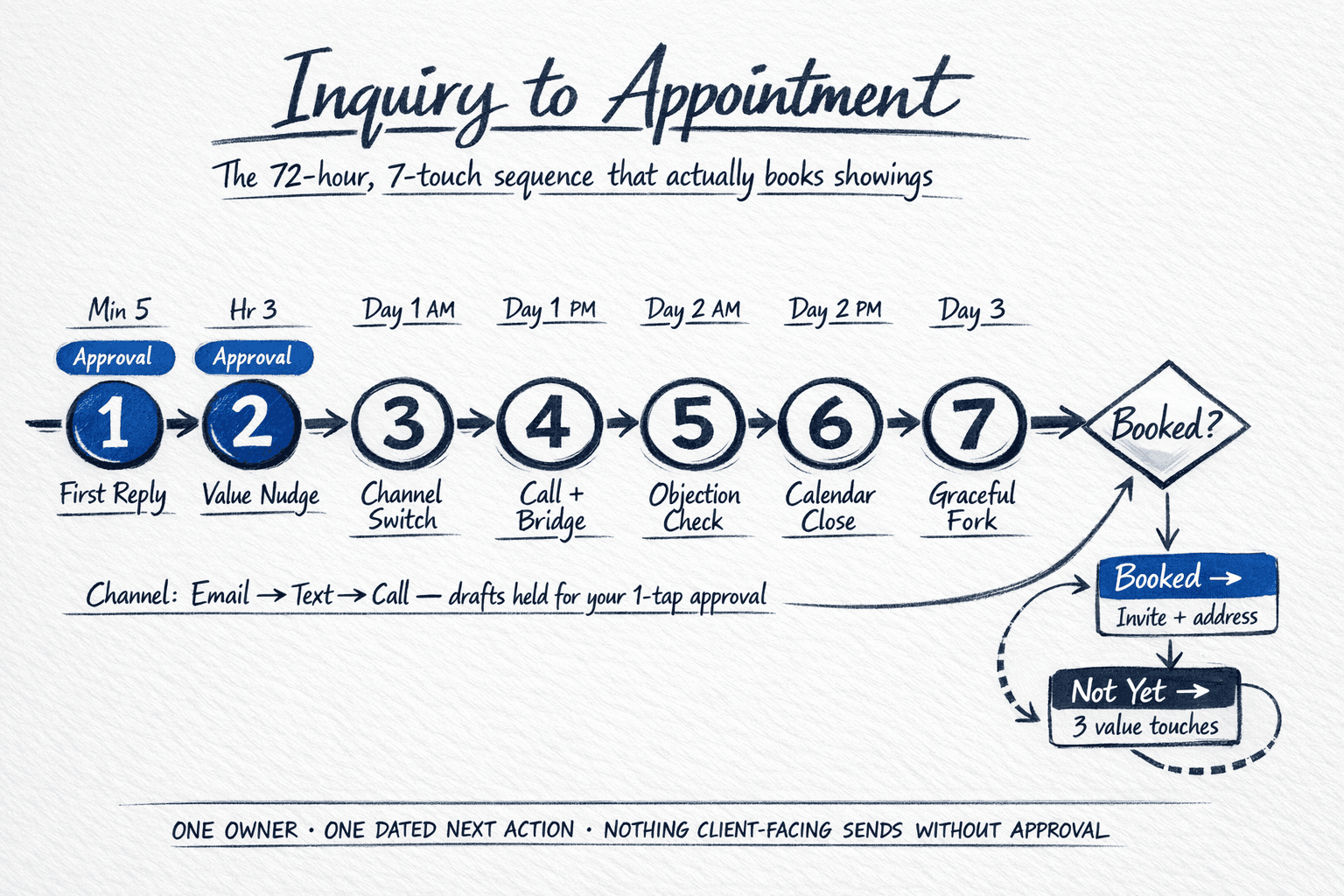
Most CRMs can tell you what percentage of inquiries got a reply. Few can tell you what percentage got to the calendar — and that is the number that predicts revenue. A fast, approved first reply opens the door. A disciplined 72-hour sequence walks through it. Without it, 60 to 70 percent of inquiries that replied once go quiet before an appointment is ever offered twice.
Why inquiries die after the first reply
- The reply was fast but generic: no reference to what the buyer actually asked, so there is nothing to continue.
- The next step was vague: “let me know what works” instead of two specific times with a one-tap hold.
- Follow-up depended on memory: Tuesday got busy, the thread sank, and no system recreated the task.
- No owner for the sequence: everyone assumed someone had it, so no one did.
The 72-hour, 7-touch sequence
Every touch is drafted by the team and held for your approval. The first two — where a property, price, or time commitment is introduced — are approval-required by default. The rest batch to your rhythm. One owner, one next action, dated.
- Touch 1 — Minute 5 (email or text, their channel): the approved first reply. Names their question, answers from your fact sheet only, offers two specific times in the next 48 hours, and holds a calendar option without committing. Approval required.
- Touch 2 — Hour 3 (same thread): the nudge with new value. One additional proof — floor plan, recent comp note dated and sourced, or a 20-second walk-through clip — plus the same two times restated. Approval required if a new factual claim was added.
- Touch 3 — Morning, Day 1 (opposite channel): channel switch. If touch 1 was email, this is text and vice versa. Short: “Did the times not work? I can also do [two new options].” Draft held for your one-tap approval.
- Touch 4 — Afternoon, Day 1 (phone call attempt + voicemail/text bridge): call, no pitch. If no answer, a 15-second voicemail and an immediate text bridge: “Left a quick voicemail — keeping your two holds here: [times]. Reply 1 or 2 and I’ll confirm.”
- Touch 5 — Morning, Day 2 (email): objection-aware check. “Most buyers at this stage ask about [top 2 objections for this property type] — want the one-page note on that, or should I release the holds and follow up when timing shifts?” Gives a real reason to reply either way.
- Touch 6 — Afternoon, Day 2 (text): calendar close. “Holding [Time A] and [Time B] until 5pm today, then releasing. Want me to lock one in?” Creates a gentle deadline without pressure language.
- Touch 7 — Day 3 (email): the graceful fork. “No pressure on timing — I’ll move you to brief monthly updates unless you tell me otherwise. If the timeline moved, reply ‘still looking’ and I’ll keep two fresh times ready.” This is where the sequence earns permission to nurture instead of pestering.
When they say not yet — the nurture fork
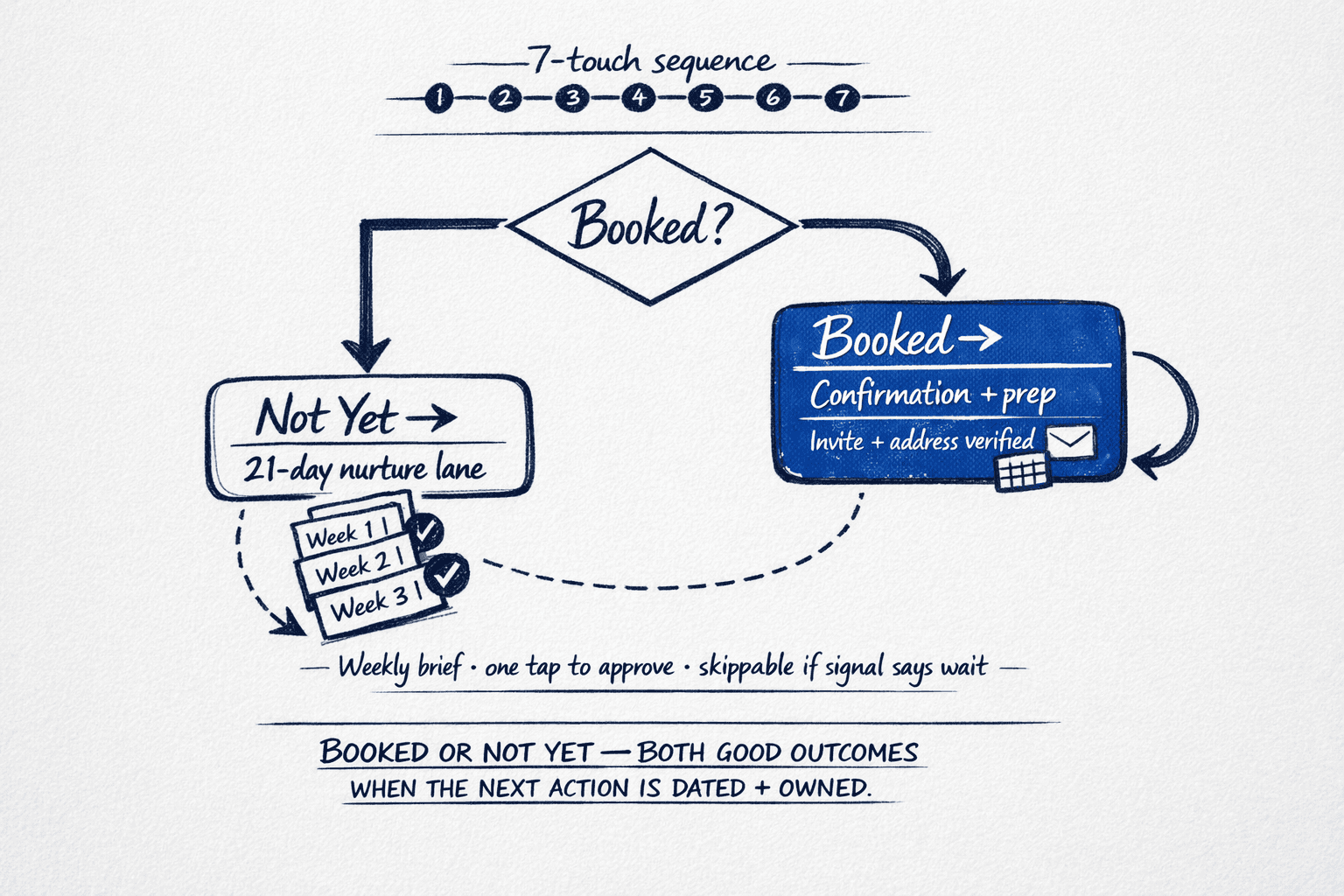
A not yet is not a loss. It is a routing decision. The sequence forks cleanly: booked moves to confirmation and pre-showing prep (address re-verified, disclosure language re-checked, calendar hold converted to invite with the right owner). Not yet moves to a 21-day nurture lane — three short, reason-based touches, each drafted and held for approval, each skippable if the signal says wait. No one is added to a permanent broadcast. Permission is renewed by reply, not assumed from inquiry.
- Booked: confirmation sent, calendar invite carries the approved address and instructions, and the weekly pipeline brief counts it as moved — not just contacted.
- Not yet, still looking: three weekly touches, each referencing the original inquiry and the property type, each with a new piece of value (not a re-send). Approval before every send.
- Not yet, timing shifted: monthly check-in with a real reason tied to their stated timeline (lease end, school year, rate watch) — drafted from history, not a template.
- Unresponsive after touch 7: suppressed for 21 days, then eligible for seasonal database nurture only if consent and identification rules are met.
What your CRM should show every morning
If the review takes longer than two minutes, the system is reporting activity instead of exceptions. The morning view is four numbers:
- New inquiries with no dated next action: should be zero by 9am.
- Touches due today by owner: who owes what, in which channel.
- Stalled past hour 48 without a reply: reason-tagged and escalation-timed.
- Appointments booked versus offered this week: the conversion that matters.
Where this fits in your operating system
This sequence sits between speed-to-lead and pipeline. Start with the speed-to-lead system that gets the first reply out in minutes without losing your voice, diagnose the gap with the lead follow-through audit, and keep what you book visible in the one-page weekly pipeline review. The same human-approval boundary governs every step: the team drafts, you decide — and some things are never delegated at all.
Questions we hear
Is seven touches too many? Will we look pushy?
Seven across 72 hours across three channels feels attentive when each touch adds value or a real choice — not when it re-sends the same ask. Touch 7 explicitly earns permission to pause. The teams that get complaints are the ones that broadcast without a fork; the sequence above suppresses itself by design.
Do texts require prior consent?
Yes — and the operational rule is conservative. First touch follows the channel they used to contact you. Any added text follow-up respects prior express consent, identification, and opt-out — managed as part of the workflow, not as an afterthought. When in doubt, the team drafts as email and flags the text alternative as approval-required.
What if we cannot offer two holds within 48 hours?
Offer the next two you actually have, even if one is three to four days out — specificity still beats “let me know what works.” The standing holds are a weekly decision you make once, not per inquiry. That is what keeps the sequence from depending on your memory that day.
How do we staff this without hiring?
That is the [operating-model question](/insights/choosing-your-operating-model-solo-team-brokerage). The five-role team drafts, routes, and tracks the sequence; you approve. The diagnostic maps whether Solo (one owner, one book), Team (shared routing), or Brokerage (governed oversight) matches the inquiry volume you already have. [The first workflow — often this one — runs from day one](/insights/first-workflow-in-10-days-what-actually-ships), with a rollback plan before go-live.