From inquiry to approval — one workflow, end-to-end
One anonymized inquiry, traced from portal arrival through the approval gate to a booked showing — every handoff, every draft-held-for-approval, and where the five-person core keeps the follow-through from depending on your memory.
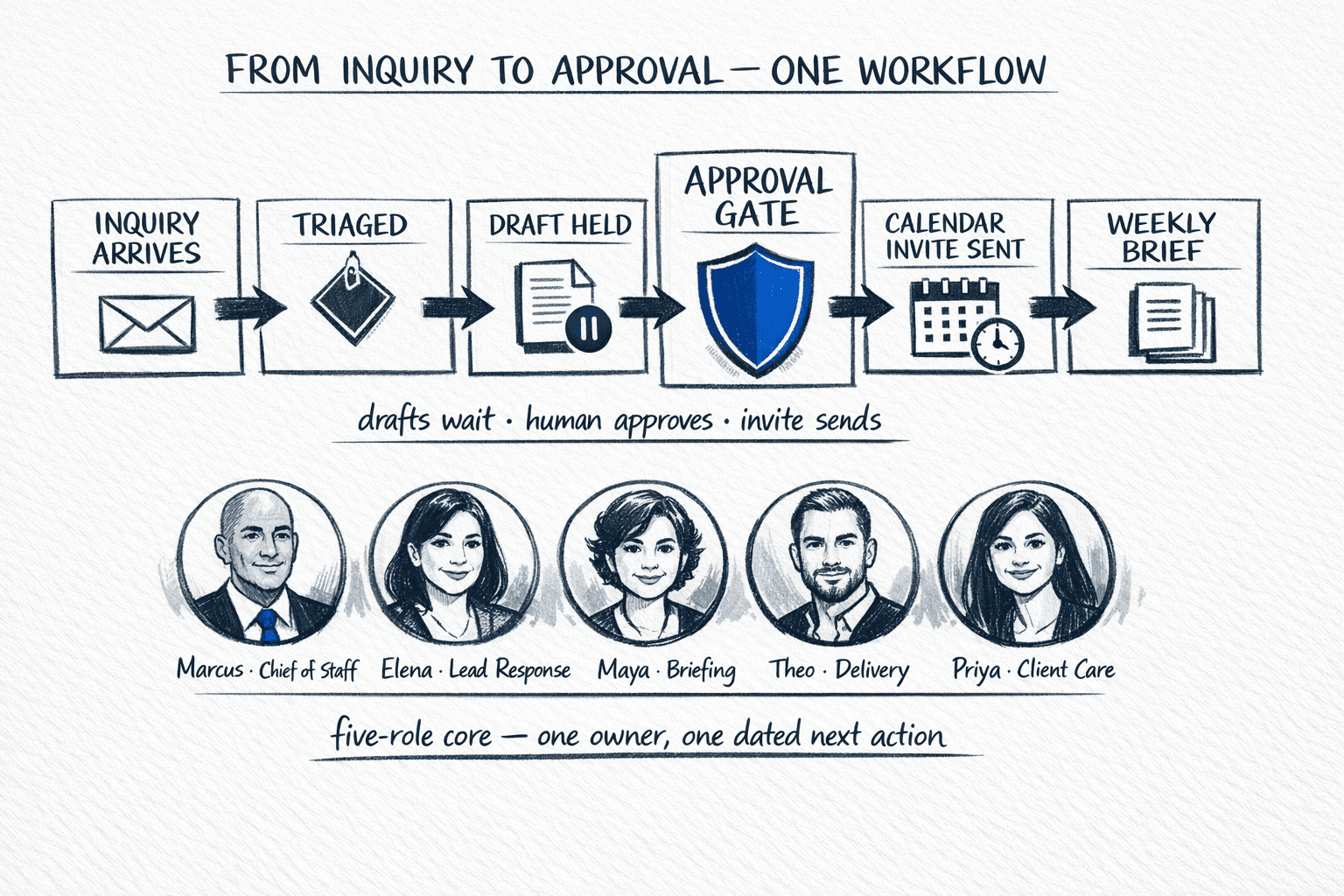
Abstract workflows are easy to agree with and easy to ignore. This one is concrete. A single anonymized inquiry from this quarter — mid-market, three-bedroom, portal-sourced — traced end-to-end so you can see where time is saved, where approval actually happens, and where deals usually stall when no one owns the next step. No names, no addresses, no invented quotes. Just the operating sequence we install first, the same one that sits between the first reply and the weekly exception review.
The inquiry, anonymized — what actually arrived
Tuesday, 9:42 a.m. A portal inquiry: buyer asks if the home is still available, whether a Saturday or Sunday showing is possible, and what the school assignment is for that block. The listing is active, fact sheet is approved and dated, showing windows for the next 48 hours are already standing. Nothing in the inquiry references motivation, family composition, or financing — and the reply does not invent any of it. The anonymized record captures only channel, timestamp, property type, questions asked, and consent status — enough to draft well, not enough to mislead.
- Source: portal form, captured to inbox and CRM as one thread — not two copies in two tools.
- Intent tags: availability check + showing request + school-assignment question. No assumption about urgency or budget.
- Context attached automatically: approved fact sheet (price, status, school source dated), your standing hold times for the next 48 hours, and your voice note — how you greet, how you close, the phrases you never want sent.
- Consent check: first reply follows the channel they used. Any added text follow-up later is flagged against prior express consent, identification, and opt-out before it is even drafted.
From arrival to approval gate — who did what, in what order
The five-person core does not mean five people replying. It means five clear owners so you are not the router. Here is the same inquiry as the system actually handled it:
- Minute 0–1 — triage (Elena, Lead Response): inquiry deduplicated, thread created, next action dated. Marcus (Chief of Staff) assigns the single owner for this thread — Elena — and the boundary memo is checked so the workflow knows what is approval-required in this context.
- Minute 1–3 — draft (Elena): reply drafted from your approved sends and the fact sheet only. It names all three questions, answers availability and school assignment from the sourced fact sheet line, offers two specific holds from your standing calendar, and does not commit the calendar — it holds. Any dimension, feature, or market claim not on the fact sheet is omitted, not invented.
- Minute 3–4 — approval gate (you): one decision on your phone — approve, edit, or skip. You tap approve. The edit path refines the next draft; skip suppresses the thread with a reason. Sensitive, public, regulated, and commitment actions fail closed until you approve — the core guarantee of the human-approval boundary.
- Minute 4–5 — send and log (Elena + Theo): approved reply sends from your address, in your voice, on the channel they used. CRM updated, next action dated, and a 3-hour nudge scheduled only if no reply lands. Theo (Delivery Coordinator) confirms the calendar holds are still clean and routing is correct.
- Hour 3–4 — if no reply (Elena): touch 2 is already drafted and held — same two times restated, one additional approved proof (floor plan or dated comp note) — waiting for your one-tap approval only if a new factual claim was added. This is the early spine of the 7-touch sequence without re-deciding the calendar each time.
- Reply lands — qualification and hold (Elena + Marcus): buyer picks Saturday 11am. No auto-commit. The draft confirmation — with re-verified address, showing instructions, and required disclosures from the approved record — is held for approval. Marcus escalates the single decision: confirm this hold as an invite? You approve; the invite sends and the next action moves to pre-showing prep.
The system drafts in seconds and waits. The human approves once and moves on. That separation is the workflow — not a delay in it.
— The operating rule behind the approval gate
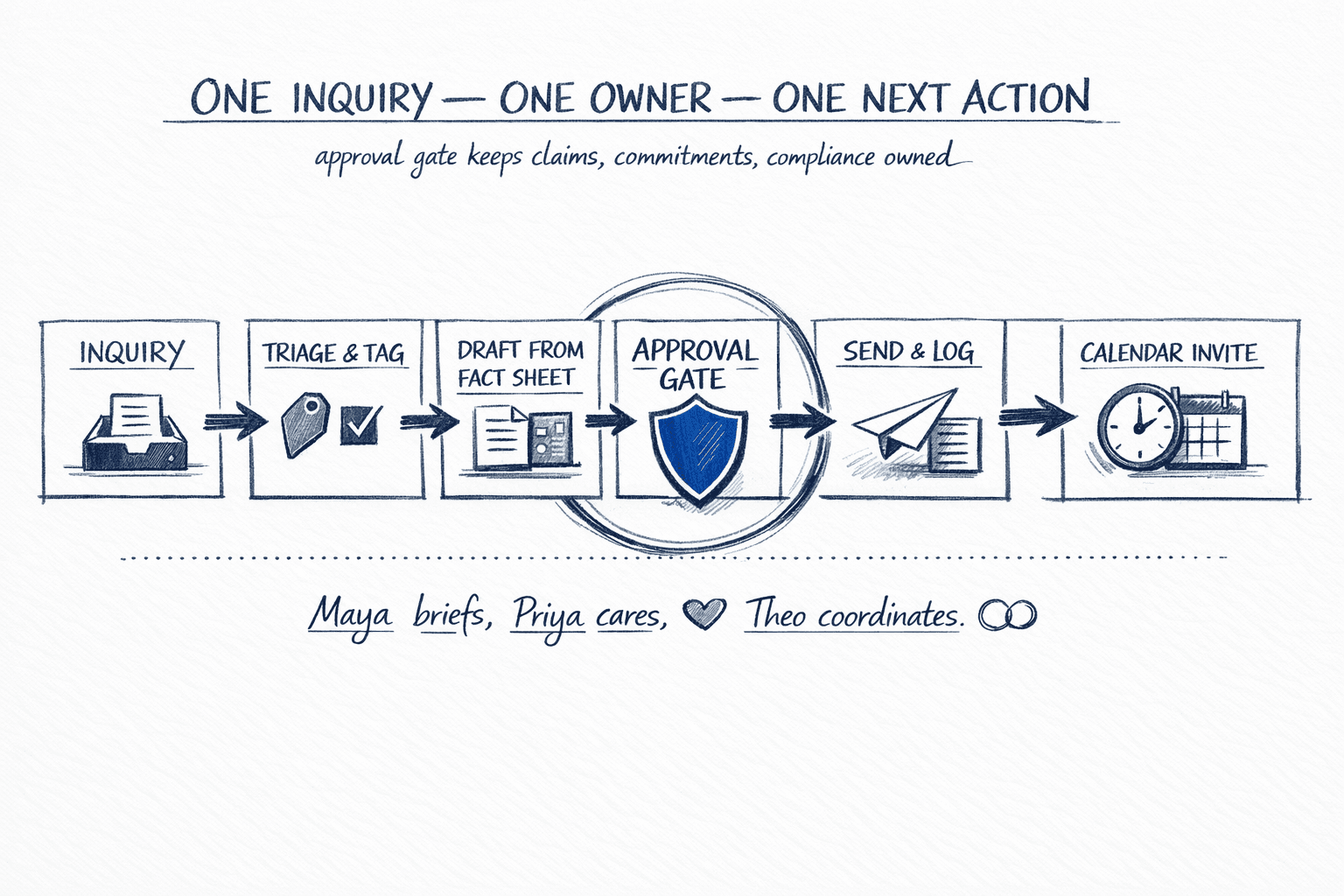
The fork: booked, not yet, or blocked
Not every inquiry books on touch one. The workflow earns trust by handling the other outcomes cleanly — no permanent broadcast, no assumed permission.
- Booked: confirmation invite sent with the approved address and instructions re-checked, CRM moved from contacted to appointment, and Theo queues pre-showing prep. The weekly pipeline review counts it as moved, not just contacted.
- Not yet: the 7-touch nurture fork takes over — up to three weekly touches in 21 days, each referencing the original question and adding new approved value, each held for your approval and skippable if the signal says wait. Suppression rules enforce it: recent opt-out, recent complaint, or recent personal conversation — no blind sends.
- Blocked or needing judgment: school-boundary nuance, access restriction, or a pricing question outside the fact sheet — flagged to you with context and a recommendation, not auto-answered. Licensed judgment, legal interpretation, and access changes are never delegated.
What shows up in the weekly review — and what didn't need you
By Monday, Maya (CEO briefing) has reconciled this thread into the one-page exception brief alongside every other active inquiry — not as activity, but as decisions.
- Moved this week: one inquiry advanced from portal arrival to booked appointment — next action is showing prep, owned by Theo, due before Saturday 11 a.m.
- Stalled: none for this thread. Others past 48 hours without reply are reason-tagged with owner and escalation time — visible without hunting.
- Risks: none — no unapproved claim sent, no fair-housing language introduced, no consent exception. Any thread where a claim or text required consent would appear here as blocked until approved.
- Next 3 decisions: only the ones that need you — a showing-window renewal for next week and two nurture approvals for not-yet threads. The rest is already drafted-and-held for your batched review.
That is why this workflow ships first. Your pod goes live fast with pre-built workflows day one, your first session tailors the rest together, then this exact inquiry-to-approval sequence runs held until it is proven. Priya (Client Care) later carries the same discipline into past-client nurture and referral asks, but only after the live-inquiry muscle is proven. The diagnostic tells you honestly whether Solo, Team, or Brokerage scope matches your volume — see choosing the offer that fits — before a second workflow is scoped.
Questions we hear
Is this a real client story?
It is an anonymized, composite walk-through built from common portal-inquiry patterns — no client name, address, or personal detail. The times and handle are illustrative; the handoffs, approval gates, and suppression logic are the actual workflow we install. We do not publish named testimonials with quotes; the proof is the exception brief and the booked appointments you can verify in your own CRM.
Does every inquiry go through the full 7-touch sequence?
No. The 7-touch sequence in [inquiry to appointment](/insights/inquiry-to-appointment-7-touch-sequence) is the disciplined fallback when the first reply does not book. In this walk-through, the first approved reply booked the showing, so touch 2 never sent. When they say not yet, the team forks to nurture — drafted and held for approval, with permission renewed by reply, not assumed.
What if I am on a showing and cannot approve in minutes?
Your boundary memo decides in advance. Most teams batch routine approvals twice daily and allow real-time pings only for time-sensitive first replies. You can also name a delegate for that window or allow a narrow, pre-written fallback for that specific case. Sensitive, public, regulated, and irreversible actions still fail closed until a human approves — see the [approval boundary](/insights/where-ai-drafts-and-you-decide-approval-boundaries).